
Run Ettihad by conversation.
Fary is purpose-built and maintained by Ettihad—not assembled as a general automation workflow. The AI model interprets your request; Ettihad enforces which data and fixed operations it may use. Fary has no independent permissions and no autonomous background work, and every change waits for your confirmation and a fresh permission check.
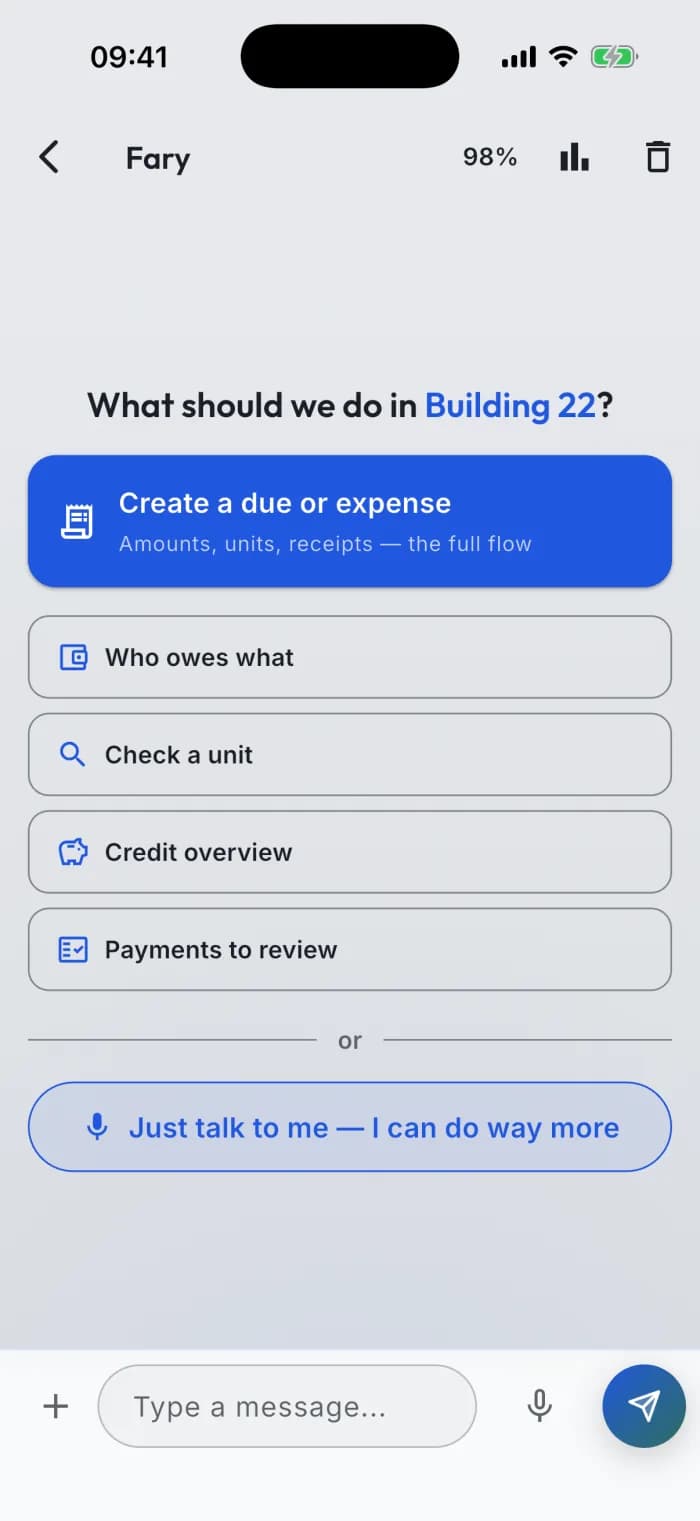
A conversational command interface for Ettihad — not a smarter chatbot.
A command interface with live cards: 90 real operations — 44 that answer instantly, 46 that create and change real things, every one of them waiting for your confirm. In Arabic. Even by voice.
Fary brings both sides together in one consumer mobile product: it reads live records into tappable cards, stages every supported change for your confirmation, and opens the exact app screen behind the answer. Its fixed operation catalog and permission boundaries are part of Ettihad — not promises left to the model.
90 verified operations — 44 read-only · 46 actions you confirm
- verified operations
- 90
- read-only
- 44
- actions you confirm
- 46
Fary reads live community data and prepares real actions across members, units, finances, voting, services, announcements and access — never with more permission than you have.
A prompt gallery
Some prompts just read. Others draft an action you confirm.
- Show this month's expenses
- Who hasn't paid the water bill?
- What's our total outstanding?
- List units in Building 2
- Send a maintenance announcement
- Split the elevator repair across all units
- Start a vote on the new building door
- Prepare a community invite link
It doesn't just tell you — it hands you the screen.
Fary replies through a live interface: every answer and every drafted action arrives as a card you read at a glance — and tap to open the real due, unit, member, or proposal. Conversation becomes a second way to move through the whole app.
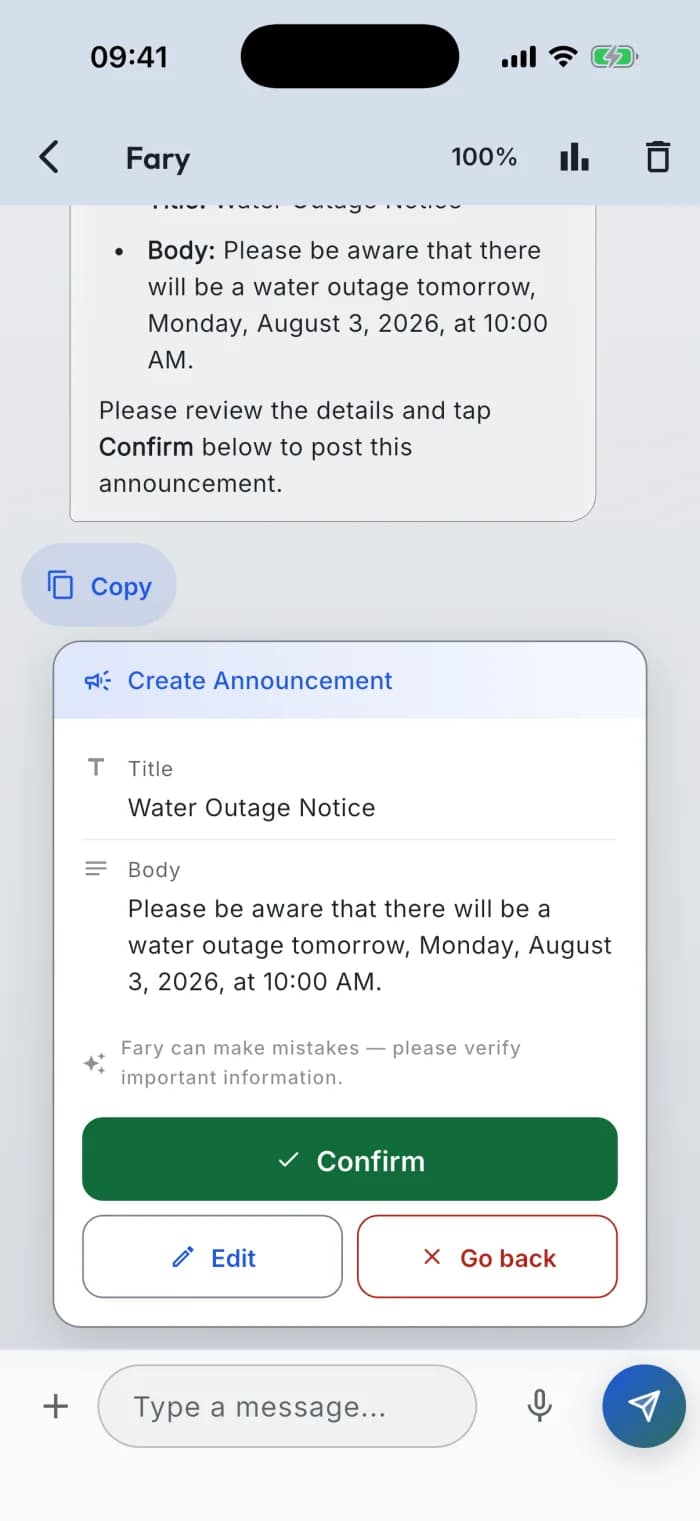
Every action arrives as a preview first — the exact title, content and amounts, with Confirm, Edit and Cancel underneath.
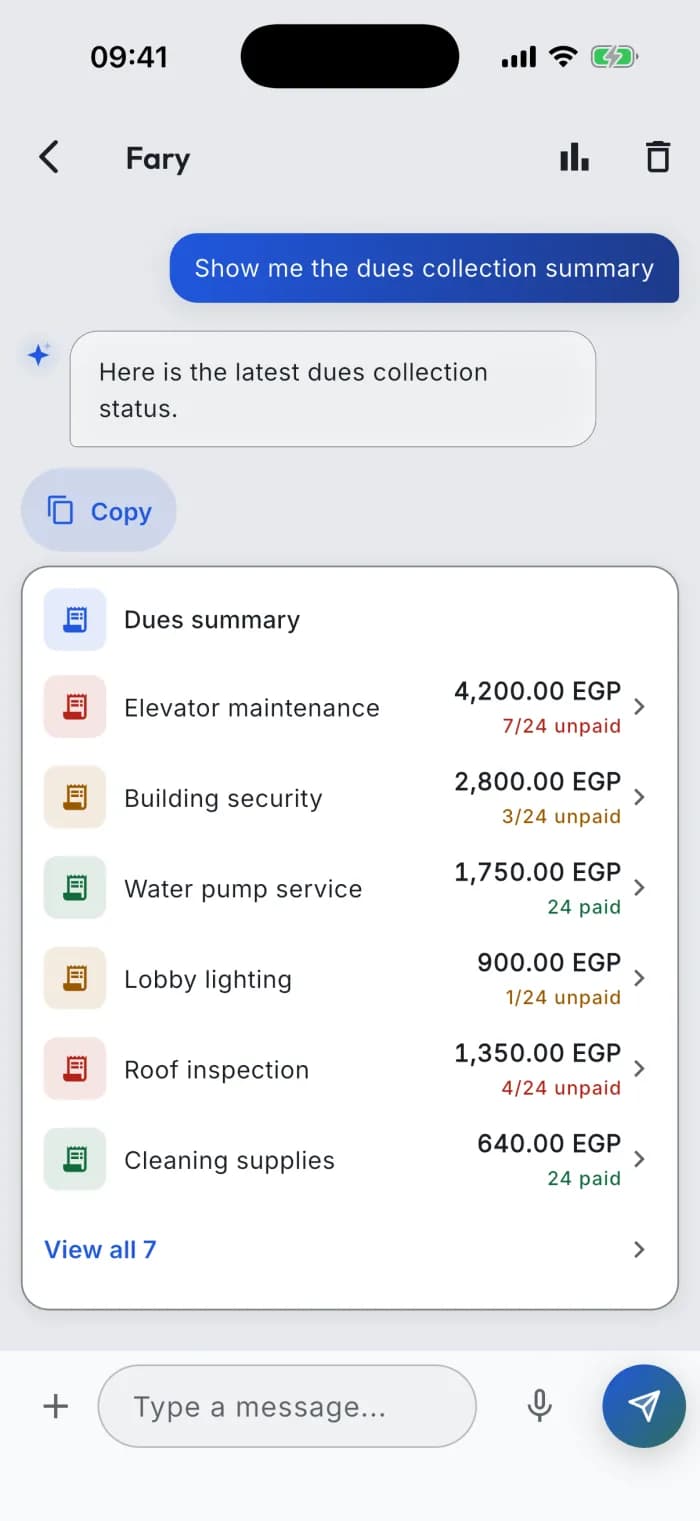
Ask about the money and you get your own numbers, laid out — tap any line to open that due in the app.
Every card is a shortcut — tap it to jump straight to that due, announcement, or unit in the app.
From ask to ready unit
A vacant unit, start to finish: you ask for unit 17 on floor 4, Fary stages it as a card, and the moment you tap Confirm the unit exists — ready for its residents.
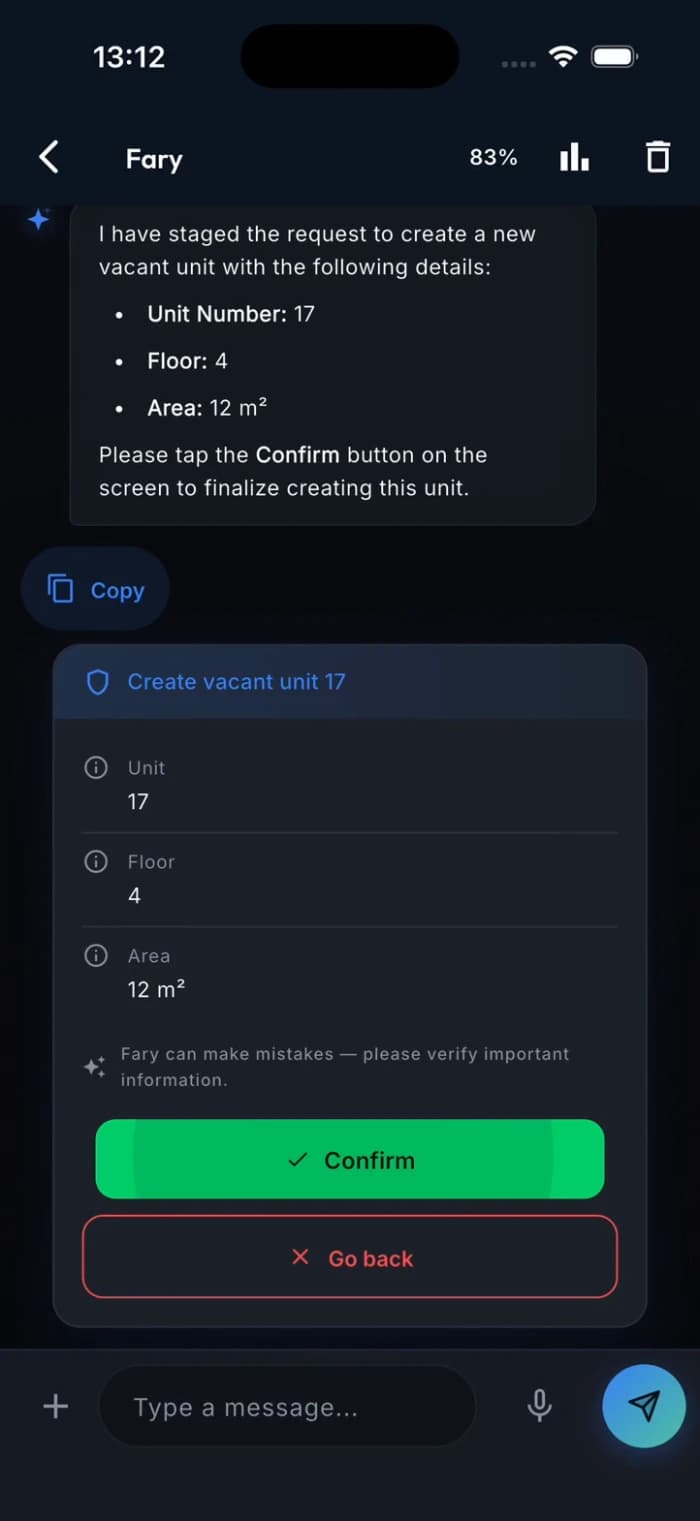
It always asks before it acts.
Every action surfaces as a card you review — title, content, amounts. Fary holds no rights of its own: nothing is sent, charged, or published until you tap Confirm — and the system re-checks your permissions then.
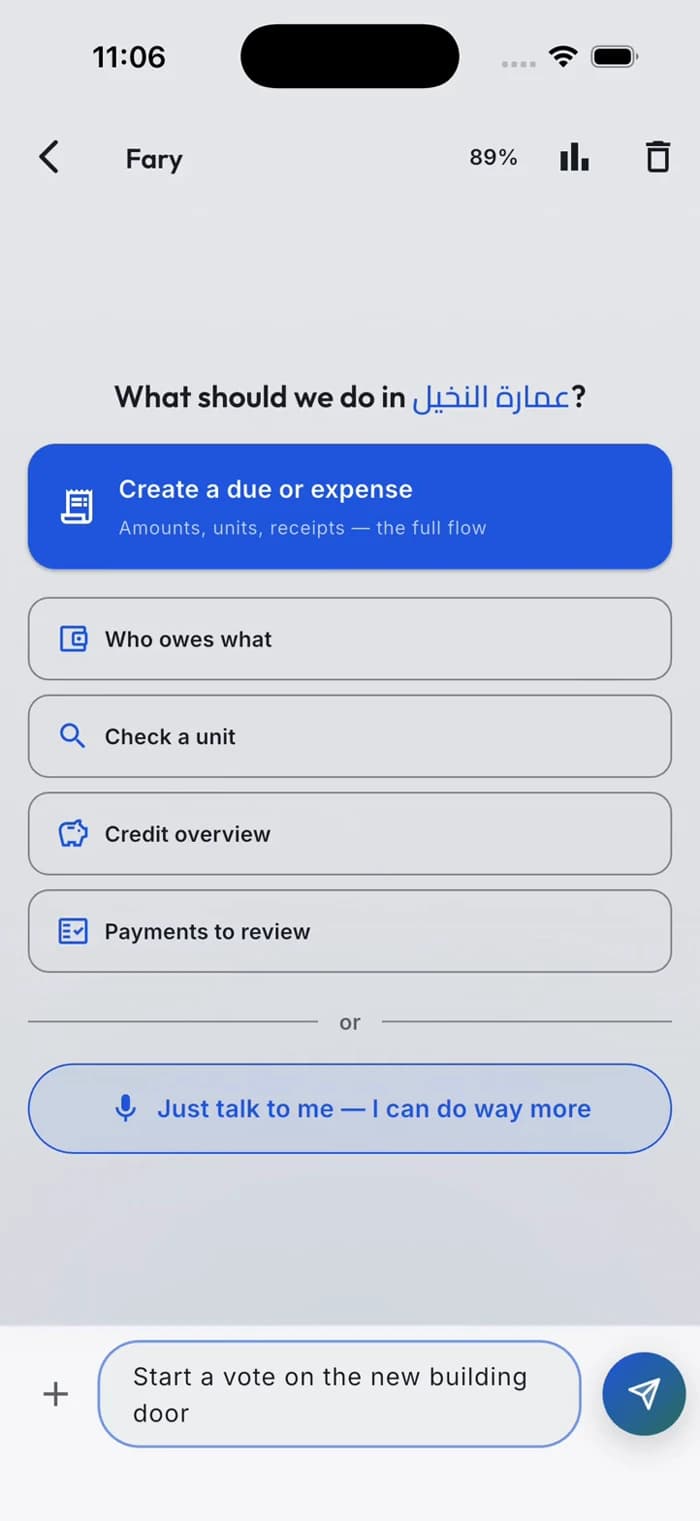
Watch it live: a community vote staged as a card — voting doesn't open until you tap Confirm.
Explore all 90 chat operations
Open an area to see what Fary can read or prepare for your confirmation.
General assistance1 read · 0 actions
- Get help using Ettihad and finding featuresRead-only
Members, invites and units14 reads · 18 actions
- View my profile and community unitsRead-only
- Review the community setup checklistRead-only
- Review recent community activityRead-only
- Find neighbors and community membersRead-only
- Browse available service providersRead-only
- Review pending join requestsRead-only
- Review member invitations and their statusRead-only
- View a unit's detailsRead-only
- Search units and residentsRead-only
- Browse all community unitsRead-only
- Promote a member to adminAction — you confirm first
- Change an admin back to a memberAction — you confirm first
- Remove a member from the communityAction — you confirm first
- Accept a join requestAction — you confirm first
- Reject a join requestAction — you confirm first
- Create and share an invite linkAction — you confirm first
- Revoke an active invitationAction — you confirm first
- Assign a member to a unitAction — you confirm first
- Remove a member's unit assignmentAction — you confirm first
- Create a vacant unitAction — you confirm first
- Create all the units of a building at onceAction — you confirm first
- Set a unit's floorAction — you confirm first
- Set a unit's areaAction — you confirm first
- File a community issueAction — you confirm first
- View my filed community issuesRead-only
- View one community issue with management notesRead-only
- View the community issue boardRead-only
- Review the community issue queueRead-only
- Update a community issue statusAction — you confirm first
- Add a resolution note to a community issueAction — you confirm first
- Decide community issue visibilityAction — you confirm first
- Send a problem or idea about the app to the Ettihad teamAction — you confirm first
Finance, dues and credit18 reads · 12 actions
- Review pending duesRead-only
- Review payments awaiting approvalRead-only
- View a due's detailsRead-only
- View member responses to a dueRead-only
- Review a due reconciliation reportRead-only
- View dues for a unitRead-only
- Browse all expensesRead-only
- View the community finance summaryRead-only
- View payment review statisticsRead-only
- View the latest expensesRead-only
- View community credit balancesRead-only
- Get the offline payment linkRead-only
- View a member's credit balanceRead-only
- Review pending credit top-upsRead-only
- View my duesRead-only
- View my dues summaryRead-only
- View my credit balanceRead-only
- View credit transaction historyRead-only
- Record a new expenseAction — you confirm first
- Split a new expense across unitsAction — you confirm first
- Prepare a collection campaignAction — you confirm first
- Archive a dueAction — you confirm first
- Delete a dueAction — you confirm first
- Record a paymentAction — you confirm first
- Mark a due as paidAction — you confirm first
- Request a credit top-upAction — you confirm first
- Approve a credit top-upAction — you confirm first
- Decline a credit top-upAction — you confirm first
- Adjust a member's creditAction — you confirm first
- Top up a unit's creditAction — you confirm first
Proposals and elections4 reads · 3 actions
- Browse community proposalsRead-only
- View a proposal's detailsRead-only
- View a proposal's votesRead-only
- View the current electionRead-only
- Create a community proposalAction — you confirm first
- Start a board electionAction — you confirm first
- Cancel the current electionAction — you confirm first
Service requests3 reads · 6 actions
- Browse service requestsRead-only
- View a service provider's ratingRead-only
- View a service provider's detailsRead-only
- Request service from a chosen providerAction — you confirm first
- Create a general service requestAction — you confirm first
- Accept a service requestAction — you confirm first
- Decline a service requestAction — you confirm first
- Schedule a service requestAction — you confirm first
- Complete a service requestAction — you confirm first
Announcements2 reads · 3 actions
- Browse announcementsRead-only
- View an announcement's detailsRead-only
- Publish an announcementAction — you confirm first
- Update an announcementAction — you confirm first
- Delete an announcementAction — you confirm first
Access passes2 reads · 4 actions
- Browse visitor access passesRead-only
- View gate scan historyRead-only
- Create a visitor pass for my unitAction — you confirm first
- Create a visitor pass for a selected unitAction — you confirm first
- Revoke a visitor access passAction — you confirm first
- Edit a visitor access passAction — you confirm first
Available operations depend on what your community role allows, your community profile and enabled features.
Residents get their own Fary.
Not just managers. A resident can ask Fary about their dues, credit and community — and prepare a few actions, always confirming first.
What a resident can ask it to read
- Check your own dues, payment-review status, due details and total owed.
- See your credit balance and transaction history, including pending top-ups.
- Browse community expenses without manager-only totals.
- Read community announcements and open the full announcement.
- Browse proposals and vote tallies, and check the current election status.
- Find joined service providers, their details and ratings — and see only your own request history with them.
- Browse the local provider-card directory for community recommendations.
- Check your own service requests.
- View your own profile and community units, or ask how to use Ettihad.
- When Community Issues is available, review your own issues and management updates.
- When Community Issues is available, browse the identity-free community issue board.
Actions a resident confirms first
- Submit payment proof for your own due—review the due, amount, payment source and receipt first.
- Pay your own due from credit—review the amount applied, any remainder and your balance after payment.
- Request your own credit top-up—review the amount, payment source and optional receipt.
- Create a no-cost proposal—review the title, description and voting deadline.
- When Community Issues is available, file an issue—review its category, title, description, anonymity, board request and photos.
Every resident operation
28 operations — 22 read-only · 6 you confirm
General assistance2 reads · 0 actions
- Get help using Ettihad and finding featuresRead-only
- Check the current date and timeRead-only
Members, invites and units6 reads · 2 actions
- View my profile and community unitsRead-only
- Browse available service providersRead-only
- Browse the local provider directoryRead-only
- View my filed community issuesRead-only
- View one community issue with management notesRead-only
- View the community issue boardRead-only
- File a community issueAction — you confirm first
- Send a problem or idea about the app to the Ettihad teamAction — you confirm first
Finance, dues and credit6 reads · 3 actions
- View my duesRead-only
- View my dues summaryRead-only
- View one of my dues in detailRead-only
- View my credit balanceRead-only
- View credit transaction historyRead-only
- Browse community expensesRead-only
- Submit payment proof for my dueAction — you confirm first
- Pay my due from my creditAction — you confirm first
- Request a credit top-upAction — you confirm first
Proposals and elections3 reads · 1 action
- Browse community proposalsRead-only
- View a proposal's detailsRead-only
- View the current electionRead-only
- Create a community proposalAction — you confirm first
Service requests3 reads · 0 actions
- View a service provider's detailsRead-only
- View a service provider's ratingRead-only
- View my service requestsRead-only
Announcements2 reads · 0 actions
- Browse announcementsRead-only
- View an announcement's detailsRead-only
These are the resident operations. What's available to you depends on your permissions and the community's enabled features.
Built for trust.
Not promises about the AI — guarantees built into the system it runs on.
The AI never invents data
The numbers you see are your real numbers — never the AI's guess.
Every number in every card comes live from our servers. The AI chooses which card to show — it never writes what's inside.
Your permissions are the AI's permissions
It can never see more than you see, or do more than you can do.
Enforced on our servers with every request — not by instructions the AI is asked to follow.
A fixed set of operations — nothing improvised
It only does what the app's own buttons can do. Nothing else exists.
Fary works through a defined list of operations, the same ones the app's buttons use. It cannot invent an action that doesn't exist.
Sensitive actions wait for you
Money and members never move without your tap.
Anything that touches money or members shows you a confirmation first. Fary proposes; you approve.
Financial actions always leave a record
It leaves the same paper trail a person would.
Money-touching operations land in the community's audit log, and financial ledgers are append-only: new entries are added; existing ones are never edited in place.
What Fary is not.
Not Fary: Instructions to the AI are not a permission boundary.
Fary: Fary's permissions are enforced by Ettihad's systems — wording cannot expand them.
Not Fary: An integration with broader rights than the person using it.
Fary: Fary acts only within that person's permissions, checked on every request.
Not Fary: AI-generated numbers treated as community records.
Fary: Fary never writes your numbers. It only picks which real data to show.
Not Fary: Automation that acts before a person reviews it.
Fary: Fary asks first, and its approved actions are recorded like anyone else's.
Fary wasn't bolted on. It's the same audited, permission-checked system the entire app runs on — a conversation is just one more door into it.
Voice & bilingual.
Hold the mic and speak. It understands Arabic and English — and answers in the language you used.